

For iPad and iPhone

Pest control software for iPad and iPhone

Dispatch from the iPad on the office desk. Close jobs from the iPhone in the truck. Both screens show the same jobs in sync, and the app is free.

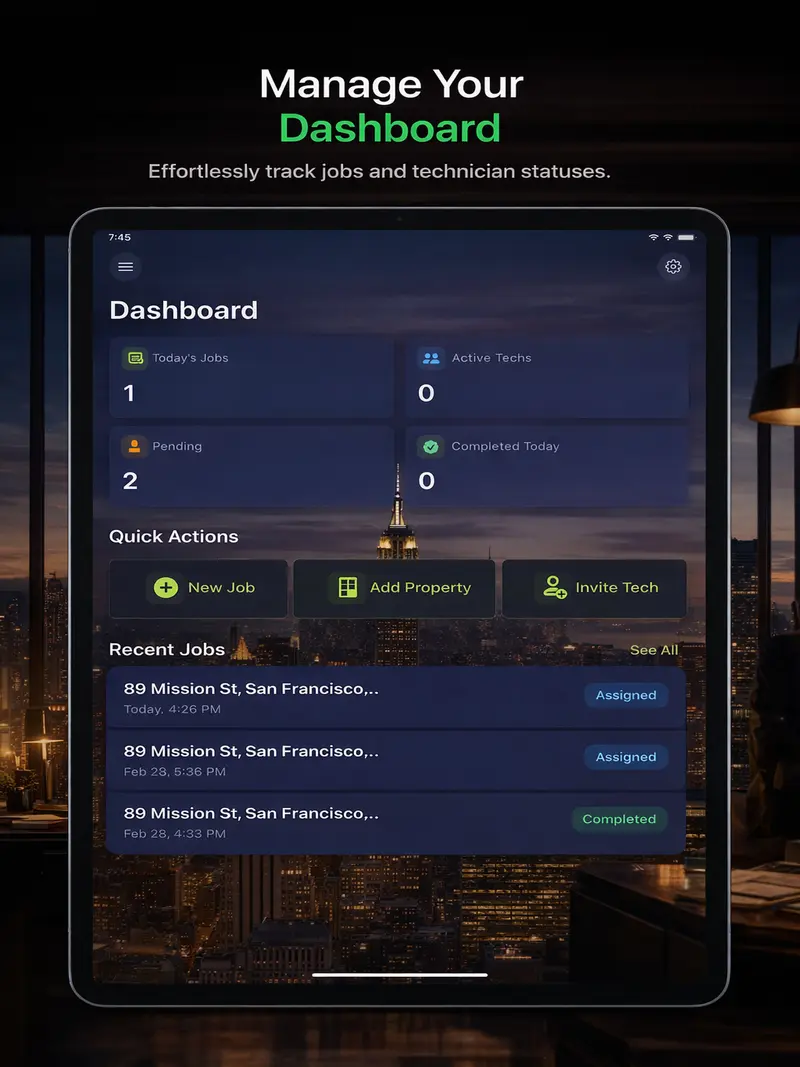
PestPro dashboard on iPad showing today's jobs, active techs, pending jobs and quick actions to add a job, property or technician
Who uses which screen

The office runs the board.
The tech closes the job.

One company account. Admins and technicians sign in on whatever device suits the work.

iPad · office or dispatch

Build the day and watch it move

The larger screen holds the whole job list, so whoever answers the phone can schedule, assign and check status without scrolling a phone.

  • Dashboard: today's jobs, active techs, pending and completed counts
  • New job: property, technician, checklist, date and time on one form
  • Filter jobs by pending, assigned, in progress or completed
  • Move a job to another tech mid-day, with its notes and photos
  • Invite a new technician with a link
  • Edit checklist templates for each pest type
iPhone · technician in the field

Everything the job needs, in one pocket

The tech gets a push notification when a job lands, works it on site, and the record is finished before the truck pulls away.

  • Pass or flag each checklist item, with a note on every flag
  • Log treatments from 500+ preloaded products with EPA numbers
  • Take photos and mark them up: circle, arrow, label
  • Customer signs on the screen
  • A PDF service report builds itself when the job closes
  • No signal in the crawlspace? It saves offline and syncs later
A service day

One job, two devices

How a single termite inspection moves from the office iPad to the tech's iPhone and back.

  1. iPad · 7:30 am

    The office creates the job

    Pick the property, assign Marco, attach the termite checklist, set 10:00. The job shows as assigned.

  2. iPhone · 7:31 am

    Marco's phone buzzes

    The job appears on his list with the address and the property's history: what was found last visit and what was applied.

  3. iPhone · on site, no signal

    He works the checklist under the house

    Foundation, wood-to-soil contact, mud tubes, frass, swarm evidence. He flags mud tubes on the north wall, photographs them, circles the tube, and logs the product he applied. The app keeps it all while offline.

  4. iPhone · back in the driveway

    The homeowner signs

    Signature on the screen, job marked completed. The app syncs once it has a connection, and the PDF report is ready to email or print.

  5. iPad · 11:05 am

    The office sees it done

    The job flips to completed on the dashboard. Photos, findings and the treatment record now live on the property for next time.

Jobs on iPad

The whole job list at a glance

Search by address, filter by status, and open any job to see who has it and when it is due. Overdue work stands out without anyone calling the truck.

  • Status filters for pending, assigned and in progress work
  • Reassign without losing the job's history
  • Same data the techs see, updated live
PestPro jobs list on iPad with assigned, pending and completed termite jobs filtered by status
Checklists on iPad

Write the inspection once, use it on every job

Build a checklist per pest type on the iPad. Every tech gets the same items on their phone, so nobody skips the bait station behind the dumpster.

  • Four default checklists to start from
  • Termite, rodent, cockroach, mosquito, bed bug
  • Items pass or flag in the field, with notes
Editing a termite inspection checklist in PestPro on iPad with foundation, mud tubes, frass and swarm evidence items
Dispatch on iPad

A new job in four fields

Property, technician, checklist, scheduled time. Leave the tech blank and the job waits as pending until someone picks it up.

  • Property history attached automatically
  • Assigned tech notified by push
  • Notes travel with the job
PestPro new job form on iPad with property, technician, checklist and scheduled date fields
Pick the device per role

Which screen for which job?

Most shops end up with an iPad in the office and phones in the trucks. Some techs carry an iPad too.

TaskiPadiPhone
Scheduling and assigning jobsBest fit: full job list on screenWorks for a quick add
Editing checklist templatesBest fitWorks
Running a checklist on siteWorks, two handsBest fit: one hand
Photos of findingsWorksBest fit: fits a crawlspace
Customer signatureBigger signing areaWorks
Showing the customer the reportEasier to read togetherWorks
Working with no signalBoth save offline and sync when back online

Android phones and any modern browser use the same account. Desk on a PC? Use the web app.

FAQ

iPad and iPhone questions

Does PestPro run natively on iPad?
Yes. PestPro is a native app listed on the App Store for both iPhone and iPad, and it needs iOS or iPadOS 18 or later. The iPad version shows the same jobs, properties, checklists and chemical logs as the phone, laid out for the larger screen.
Can the office use an iPad while technicians use iPhones or Android phones?
Yes. Everyone signs in to the same company account, and data syncs in real time across iPhone, iPad, Android and the web app. A common setup is an iPad at the office for scheduling and phones in the trucks for closing out jobs.
Does PestPro work offline on a Wi-Fi-only iPad?
Yes. PestPro works without a connection and syncs automatically once the device is back online. A Wi-Fi-only iPad can still record checklist results, photos, chemical logs and signatures at a job site, then upload them when it reaches Wi-Fi again.
Can customers sign on the iPad?
Yes. The customer signs on the screen at the end of the job, and the signature is saved to the job record. It also appears on the PDF service report, together with the findings, treatments applied and photos from that visit.
How much does PestPro for iPad cost?
PestPro is free on iPad, iPhone, Android and the web. There is no credit card, no trial period and no cap on jobs. You create a company, invite your technicians with a link, and start scheduling.
How do I add technicians from the iPad?
Open Team, create an invite, and send the link or code to the technician. They enter it when they sign up and join your company right away, with no email verification wait. Assigned jobs then reach their phone by push notification.

Put the iPad on the desk.
Put the phones in the trucks.

Free to use. No credit card, no trial, unlimited jobs.