

Scheduling and dispatch

Pest control scheduling software for small crews

TL;DRPestPro is free pest control scheduling software for small crews. The office books a job in four fields, assigns it or leaves it pending, and the technician gets a push notification. Each job is tracked from assigned to completed. It runs on iPhone, iPad, Android and the web, with no recurring auto-scheduling yet.

Put a job on the schedule in four fields, send it to a technician's phone, and watch it move from assigned to completed. Free on iPhone, iPad, Android and the web.

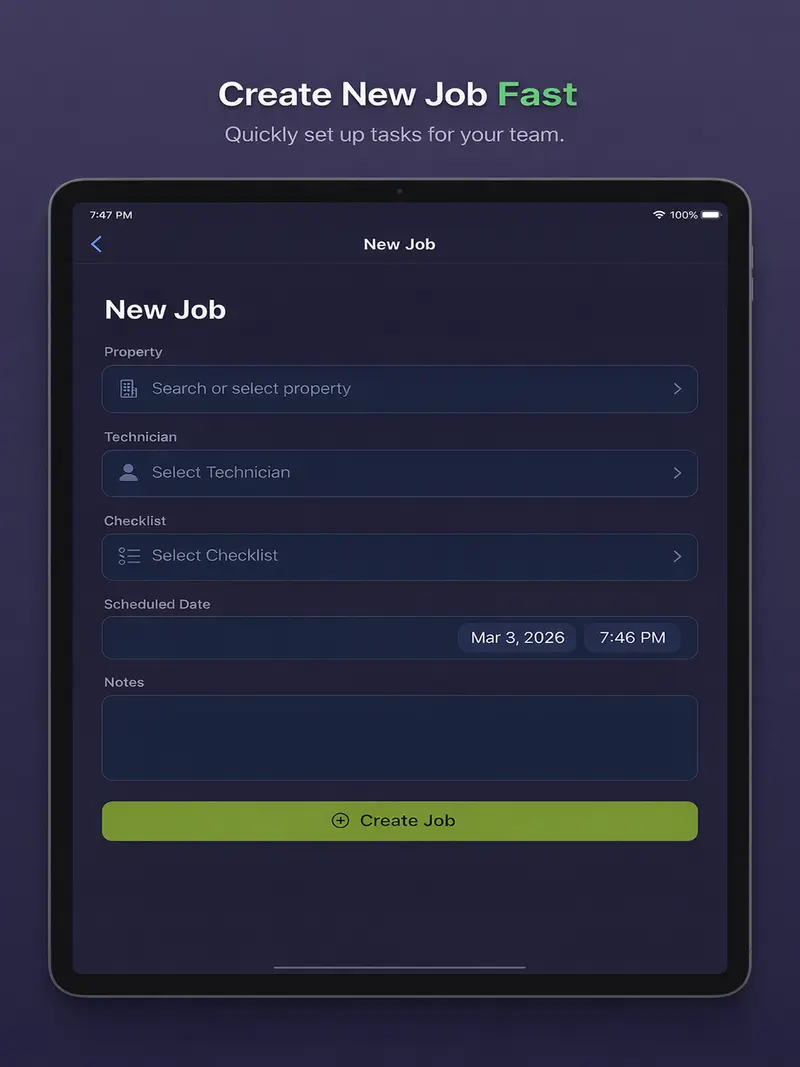
Scheduling a pest control job in PestPro with property, technician, checklist and scheduled date and time
How scheduling works

How does a job get from the phone call to the tech's truck?

The owner or office manager books the job with a property, a technician, a checklist and a date and time. The technician gets a push notification and finds the job on their dashboard and in today's route. The job then moves from pending or assigned to in progress and completed, with start and finish times stamped.

1

One form per job

Search for the property, pick a technician, attach a checklist, set the date and time, add notes. The property's past visits come with it.

2

Assign it or pool it

Name a technician, or leave the job unassigned. An unassigned job waits as pending, and the first tech who taps Start Job takes it.

3

The tech hears about it

A push notification goes out when a job is assigned, changed, reassigned or cancelled. The job is on the tech's dashboard and in today's route.

4

A live status timeline

Every job moves through pending, assigned, in progress and completed, with start and finish times stamped. Filter the job list by any status.

5

Reshuffle mid-day

Edit the time, swap the technician, or transfer an in-progress job to someone else. Photos, notes and treatments follow the job.

6

Callbacks that count

Mark a visit as a re-service of an earlier job and the reports dashboard counts it against that visit's callback rate.

Office and field

What do the office and the technicians each see?

The admin sees the whole company on iPad, iPhone or the web: today's jobs, active techs, pending and completed work, and a crew map of every open job. Each technician sees only their own day, already ordered into a route from where they are standing, on an iPhone, an Android phone or an Apple Watch.

Admin · iPad, iPhone or web

Book, assign and track

The dashboard counts today's jobs, active techs, pending and completed work, so gaps show up before the customer calls.

  • Create, edit or cancel any job
  • Crew map of every open job for a date
  • Owners can assign jobs to themselves
  • Reports by period and by technician
Technician · iPhone, Android or Apple Watch

Know what is next

The tech opens the app to their own jobs for the day, already ordered into a route from where they are standing.

  • Today's jobs with address and property history
  • Siri: "Next job in PestPro"
  • Apple Watch shows the next stop and the rest of the day
  • Start the job and the status updates for the office
The job list

See what is stuck before anyone calls

Search every job and filter by status. Pending work with no technician stands out, and an in-progress job tells you who has it.

  • Pending, assigned, in progress, completed, cancelled
  • Same list on iPad, iPhone, Android and web
  • Updates live as techs start and finish
PestPro job list filtered by status, showing assigned, pending and completed pest control jobs
From schedule to route

The schedule becomes the day's route

Every job with a date lands on that day's route. PestPro orders the stops into a short driving loop and hands the first nine to Apple Maps or Google Maps. See pest control routing.

  • Numbered stops with per-leg miles
  • Jobs without a usable address listed, not dropped
  • Completed and cancelled jobs drop off the route
PestPro admin dashboard with today's jobs, active technicians and pending work
Know the limits

What does PestPro scheduling not do yet?

PestPro is built for crews that book by phone and run a few routes a day. If you need these today, it is the wrong tool for now.

  • No recurring auto-schedulingQuarterly and monthly plans are booked visit by visit. Each one goes on the property's history.
  • No drag-and-drop calendarJobs live in a filtered list and on each tech's dashboard. You change a time by editing the job.
  • No customer remindersPush notifications go to your team. Homeowners do not get texts or emails before a visit.
  • No online booking or calendar syncCustomers cannot book themselves, and jobs do not appear in Google Calendar or Apple Calendar.
Compared

How does PestPro compare with GorillaDesk, FieldRoutes and PestPac?

PestPro is free, GorillaDesk publishes $49, $99 or $149 a month for the first route, and FieldRoutes and PestPac do not publish prices. The larger tools do more: all three describe automated customer reminders, and GorillaDesk and FieldRoutes offer drag-and-drop schedules. Every row below comes from the vendor's own site.

PestProGorillaDeskFieldRoutesPestPac
Published priceFree$49, $99 or $149 a month for the first route, more per added routeNot published: "Request Pricing"Not published: demo request
Route optimizationShortest-first stop order per tech or crewBasic plan limited to 25 stops; street-level drive times on ProIncluded in Growth and Corporate packagesRouteOp
Drag-and-drop schedulingNoYes: "Drag & Drop Calendar"Yes: "drag-and-drop" schedulesNot described on pestpac.com
Automated customer remindersNoYes: appointment reminders and SMSYes: "automated reminder notifications"Yes: by text, email or webchat

Checked on the vendors' public pages on 3 November 2026: gorilladesk.com/pricing, gorilladesk.com/features, pestpac.com, fieldroutes.com and fieldroutes.com/company/pricing, pestpac.com/resources/pest-control-route-optimization. More detail in FieldRoutes vs PestPro and PestPac alternatives.

FAQ

What do people ask about PestPro scheduling?

Is PestPro scheduling software free?
Yes. PestPro is free on iPhone, iPad, Android and the web, with no cap on jobs or technicians and no credit card at sign-up.
Can PestPro schedule recurring quarterly or monthly services?
Not automatically yet. Each visit is created as its own job with a date and time. Every visit is kept on the property's history, and a follow-up can be marked as a re-service of an earlier visit so callbacks are counted.
Can I leave a job unassigned?
Yes. Choose Unassigned when you create the job and it waits as pending. The first technician who taps Start Job takes it, and the job is assigned to them from then on.
Do technicians get notified when they are scheduled?
Yes. A push notification reaches the technician's phone when a job is assigned to them, and again when it is changed, reassigned or cancelled. Each person can choose which notifications they receive.
Can the owner schedule jobs for themselves?
Yes. Admins appear in every technician picker, so an owner-operator can put their own name on a job and work it in the field like any technician.
Can I see the whole crew's day on a map?
Yes. Admins open the route screen, pick a date, and see every open job for that day on one map in driving order, with the technician's name on each stop. See how routing works.
Does scheduling work in a browser?
Yes. The web app at pestpro.app/web uses the same account and shows the same jobs as the iPhone, iPad and Android apps, so the office can schedule from a desktop.
Does PestPro sync with Google Calendar or Apple Calendar?
Not yet. Jobs live in PestPro's job list and on each technician's dashboard. On iPhone, technicians can ask Siri for their next job or today's jobs.

Book the job.
Send it to the truck.

Free to use. No credit card, no trial, unlimited jobs.